Point of sale · Somali & English
Run your shop by the numbers, not by memory.
Sell with cash, mobile money or credit. Know what is on the shelf, who owes you, and what you made today. From the phone in your pocket or the computer at the counter.
- Free trial after approval
- No card needed
- Phone, tablet or computer
Made for shops in
- Somalia
- Somaliland
- Djibouti
- Ethiopia
- Kenya
Why Halbeeg
The notebook, the calculator and your memory can't keep up.
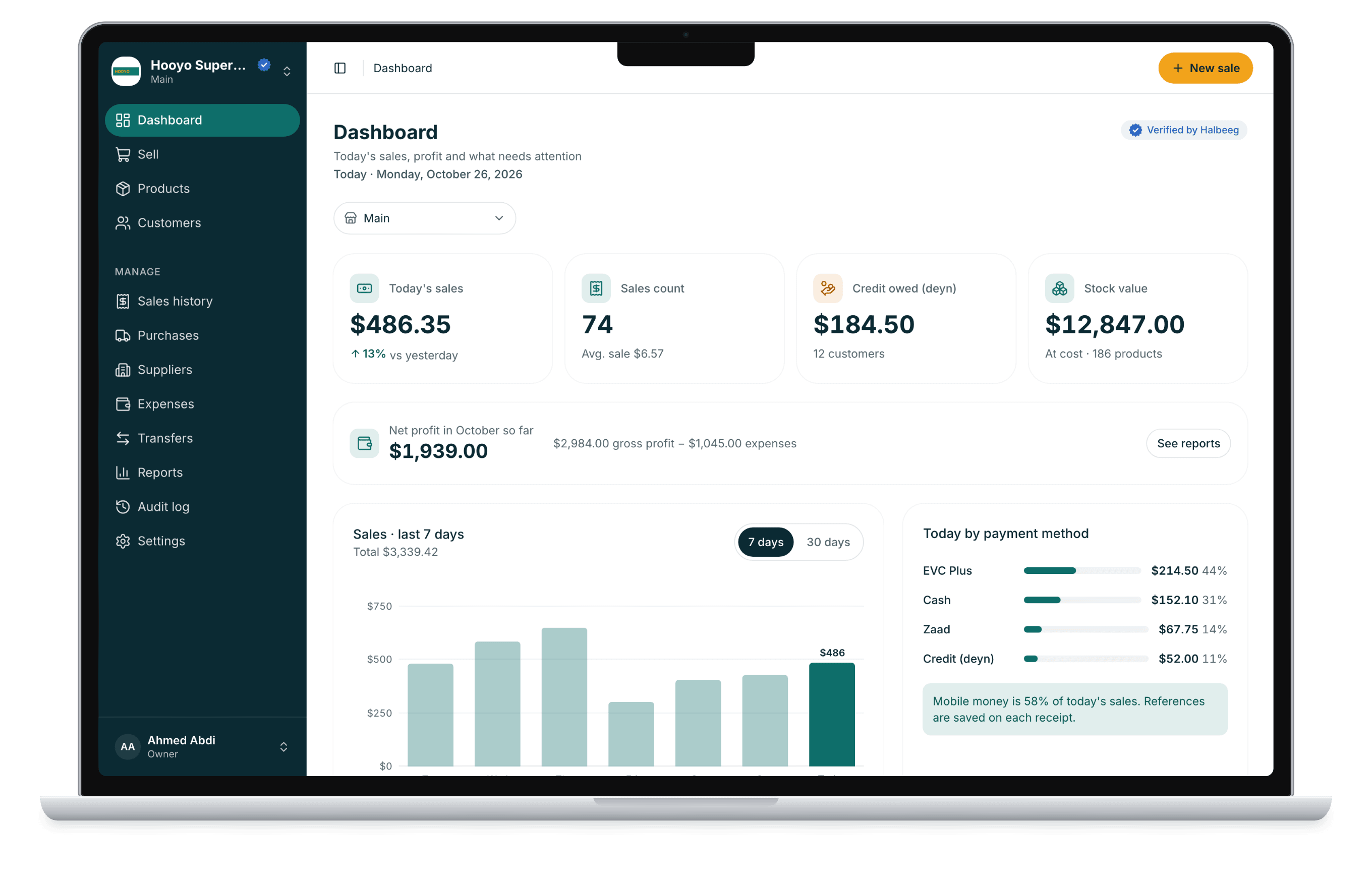
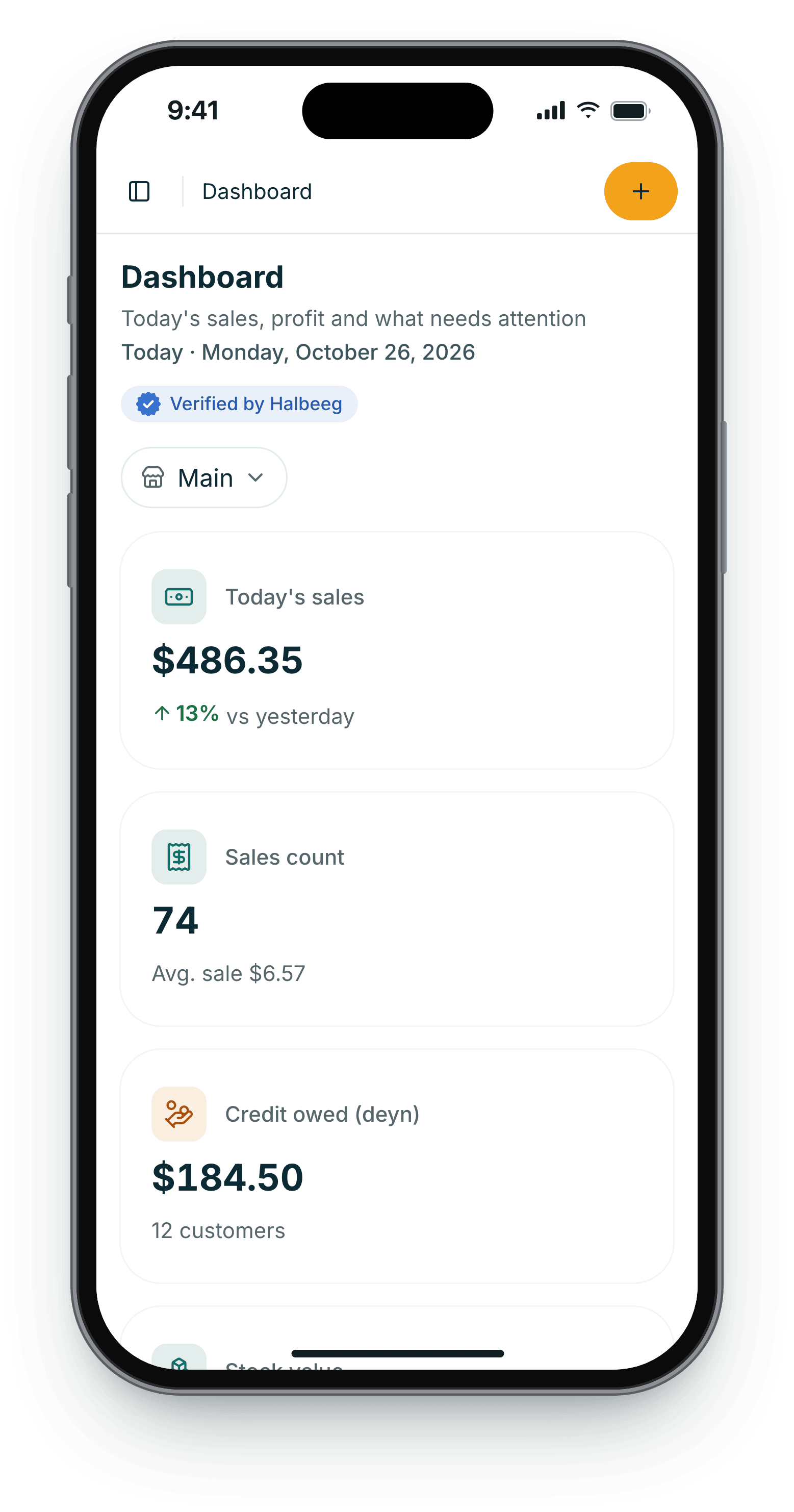
Most shops run on a credit notebook, a pile of mobile-money SMS and a count of the shelf at night. Halbeeg puts each of those in one place that adds itself up.
Without Halbeeg
With Halbeeg
Without Halbeeg
Credit lives in a notebook
Pages get lost, totals are argued over, and old debts are forgotten.
With Halbeeg
Every credit sale goes on the customer's account
See who owes, how much and since when. Repayments lower the balance, and a WhatsApp reminder is one tap away.
Without Halbeeg
You find out it's finished when a customer asks
Stock is counted by eye, and losses go unexplained.
With Halbeeg
Stock moves only with a sale, a delivery or a reason
Low-stock alerts per product and branch. Damaged, expired or lost items need a reason, so every change has a who and a why.
Without Halbeeg
Mobile-money payments hide in SMS
At the end of the day nobody can say which sale a transfer was for.
With Halbeeg
The reference is saved on the receipt
EVC Plus, Zaad, telebirr, M-Pesa and the others: the cashier types the transaction reference with the sale, and the day splits by method.
Without Halbeeg
Takings are not profit
The till is full, but after stock and rent, what was actually made?
With Halbeeg
Profit is worked out for you
Halbeeg saves each item's cost at the moment of sale, so reports show gross profit, then net profit after approved expenses.
What it does
Five jobs every shop does every day, done properly.
Each one is a screen in Halbeeg today. Choose one to see it.
And the rest
The everyday details are already built in.
Buying & costs
Purchases
Order from a supplier. Stock goes up only when you mark it received, at the real cost, short deliveries included.
Suppliers
Several contacts per supplier, what you owe each one, and payments against it.
Expenses
Rent, transport, salaries. Attach a photo of the receipt. A cashier's expense waits for approval.
Transfers
Stock in transit between branches, received with real counts.
At the counter
Camera and USB scanning
A phone's camera or any USB barcode scanner adds products. A keyboard shortcut finishes the sale.
Barcode labels
Generate a barcode for a product without one and print as many labels as you need.
Returns
Take back part of a sale. Choose whether the item can be sold again or is damaged.
Varieties
One product, many sizes or colours, each with its own price, stock and barcode.
Paper & language
Your receipt, your words
Your logo, your own header and footer, and the paper size, set per branch.
A4 invoices
For business customers and credit sales: invoice number, due date, balance due and payment details.
Print from the browser
Receipts go to 58 mm or 80 mm printers. Invoices print or save as PDF.
Somali and English
Every screen in both. Each person picks their own, and printed receipts follow it.
Currencies & payments
Your currency. Your customers' wallets.
Every business works in US dollars and one local currency, set by its country. Customers pay in either, or in the mobile money they already use.
See a sale in each currency
US dollar
Current sale
- 1 × Bariis Basmati 25kg$32.00
- 2 × Saliid 3L$15.00
- 3 × Shaah Kenya 250g$6.75
Total$53.75
Example shelf prices. Each shop sets its own prices. Local amounts follow the shop's own exchange rate.
US dollars and your local money
USD plus SOS, SLSH, DJF, ETB or KES, set by your country. Every sale keeps the amount it was paid in, so 1,000 SLSH stays 1,000 SLSH.
How customers pay you
Cash and credit always work. Turn on the wallets you accept, and the cashier types the transaction reference with each sale.
Your rate, written on every sale
You set the exchange rate, and each record keeps the rate it was made at. A new rate never rewrites a past sale.
How you pay Halbeeg
The plan is priced in US dollars and paid by mobile money to Halbeeg's accounts. Wallets in other currencies send the equivalent.
Wallets by country
Halbeeg suggests these at sign-up. You can turn any of them on or off in Settings.
| Country | Suggested currency | Mobile money |
|---|---|---|
Mobile money is recorded by hand with its reference. Halbeeg is not connected to the wallets' systems and does not move money.
Who it's for
Built for shops that sell goods.
The same Halbeeg, used differently. Products are sorted into 36 shop categories and sold in 15 units, from a piece to a carton.
Halbeeg is for selling goods. It has no table service, kitchen screens or appointment booking.
How it works
From sign-up to your first sale.
We check every business before it can sell, so the shops on Halbeeg are real shops.
- 1
Create your account
Your name, email and a password. We email you a code to confirm the address.
- 2
Tell us about the business
Say whether you own it or manage it, then give its name, country, currency and address.
- 3
Send two documents
An ID (passport, driving licence or national ID) and your business licence or certificate. Photos or PDFs.
- 4
Approved, start selling
We email you when you're approved, and your free trial starts. Add products, invite staff and sell.
If something is missing we tell you what to fix by email, and you send it again. Your documents are stored privately.
Start free trialSecurity & trust
Your shop's records stay your shop's.
Halbeeg's checks run on the server, on every request. Here is what that means for you.
Only your business sees its data
Every record belongs to one business, and every request is checked against it. No shop can see another's sales or customers.
Each person sees what their role allows
A cashier can sell without seeing cost prices or profit. Permissions are checked by the server on every action, not just hidden in the menu.
Two-step sign-in and passkeys
Owners and admins confirm each new device with an emailed code, or sign in with a passkey. You can require it for all staff.
An activity log no one can edit
Price changes, voids, role changes and settings: who, at which branch, on which device, and what changed.
Sales are never deleted
A void or a return is recorded next to the sale and reverses stock and balances, so history always adds up.
Every business is checked
Each business is reviewed with ID and a licence before it can sell. Approved shops carry a verified badge.
Pricing
One plan. Every feature.
No feature tiers, no per-branch or per-user charges. Pay monthly or save with a year.
Halbeeg
Every feature, every branch, every team member.
Start free trialPay with mobile money to Halbeeg's accounts, shown on the pay page with the amount. Wallets in other currencies send the equivalent in USD. We check the payment and email a receipt.
Included
- Point of sale with receipts and barcodes
- Products, varieties and stock
- Customers and credit
- Purchases and suppliers
- Expenses with approval
- Reports with net profit
- Branches and stock transfers
- Roles, two-step sign-in, activity log
What happens when
Free trial
Starts when your shop is approved. Paying during the trial ends it and starts your paid time.
Paid month or year
Paying early loses nothing: new time starts when the current time ends. A reminder comes 5 days before.
7 days of grace
If the plan ends, you keep selling for 7 days while you pay.
Read-only, never deleted
After that, selling and changes stop, but reports and lists stay open, and nothing is deleted. Paying turns everything back on.
FAQ
Questions shop owners ask.
Something else? Ask us on WhatsApp or by email.
Talk to us
Questions before you start?
We help you set up and answer your questions. Write to us the way you prefer.
Close today's till knowing exactly where you stand.
Start your free trial. Send your documents today, and sell once you're approved.
- No card needed
- Somali & English
- Every feature included